Customize Multi-Recipient Checkout Functionality with Custom Scripts
Extend Send To Many's multi-recipient checkout with custom Liquid, the JavaScript API, checkout hooks, and DOM events. A developer reference for the Custom script setting.
This feature is in beta. The behavior described here works today, but field names, timing, and defaults may change based on beta feedback.
The Custom script field is a raw <script> injection point, and window.s2mMultiCheckout carries customer PII: email, phone, saved addresses, and company info. Avoid echoing it into the DOM or loading untrusted third-party scripts.
Audience: Developers and technical merchants customizing the multi-recipient checkout.
Applies to: the Multi Recipient Cart v2 theme block.
Overview
The Multi Recipient Cart v2 theme block exposes a Custom Liquid setting, a JavaScript API, a checkout hook system, and DOM events that let you extend the checkout experience without modifying the app's core code. You can inject custom markup, styles, and scripts directly from the Shopify theme editor.
Everything described here runs on the storefront, not inside the Shopify admin. Your code executes after the checkout UI has rendered, so all DOM elements and window globals are available by the time your scripts run (or you can listen for the s2m:ready event to be safe).
What can you customize?
Everything from small touches to a rebuilt experience. The examples in this reference cover enforcing a minimum order value before checkout, showing a live order total in your own element, auto-applying a discount code for B2B customers, wiring up analytics events, and displaying conditional content based on customer tags.
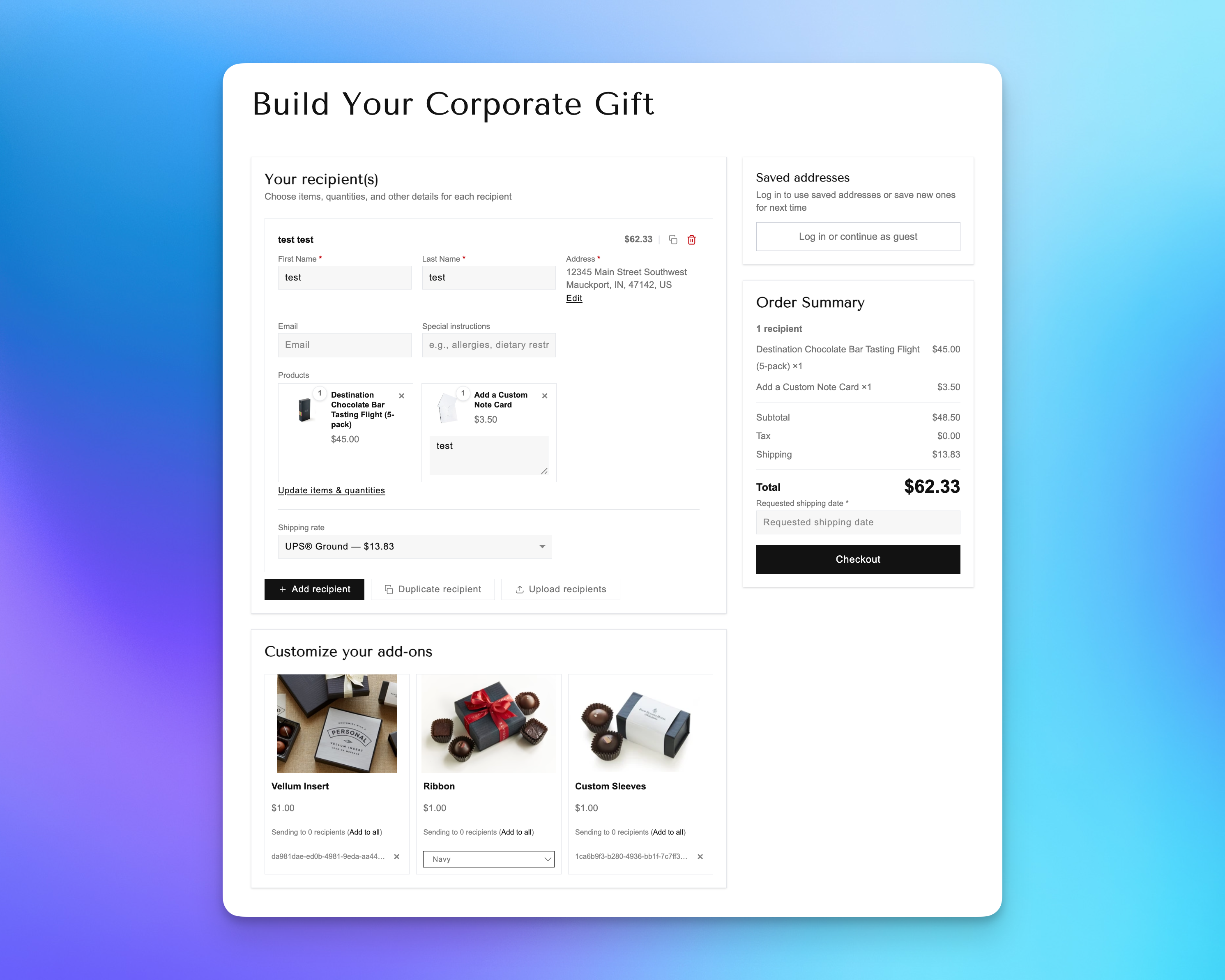
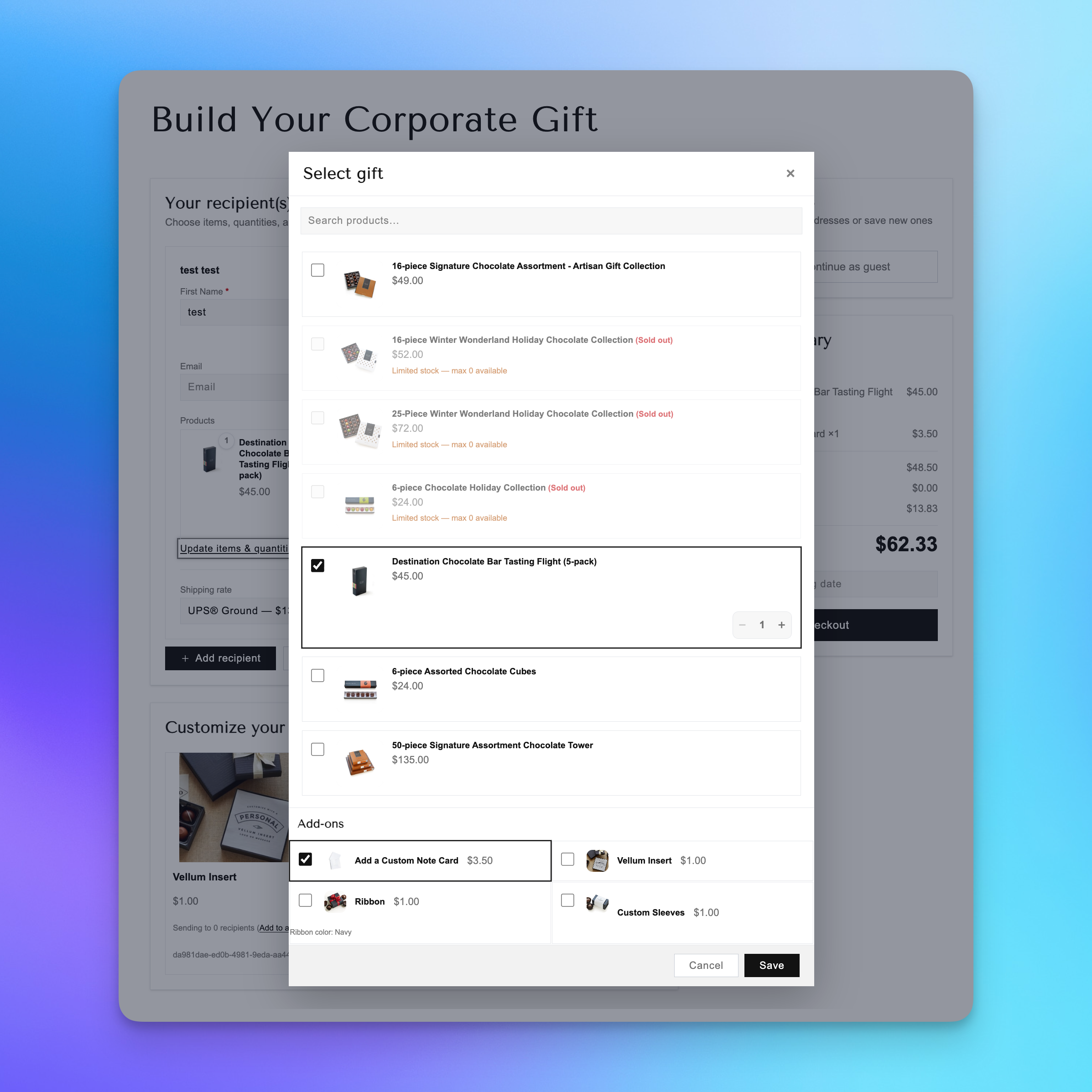
At the far end of the spectrum, Éclat Chocolate's corporate gifts page uses these customization points to reshape the checkout into a fully branded "Build Your Corporate Gift" experience. They hide the standard collection section and show all collection products in the product picker instead, surface add-ons directly in the picker, and present customization items in a card below the recipients. It's the same checkout underneath, restyled and restructured entirely through the tools on this page.
1. The Custom Liquid Setting
In the Shopify theme editor, select the Multi Recipient Cart block. Scroll to the "Custom implementation" section at the bottom. You'll see a "Custom script" field. This is a Shopify liquid type setting.
Anything you paste here renders after the checkout UI DOM. You can include:
- Raw HTML
<style>blocks for CSS overrides<script>blocks for custom JavaScript- Liquid template logic (access to
shop,customer,cart, etc.)
Limit: 50 KB per Liquid setting (Shopify platform limit).
Scope: Runs on this page only. It will not affect other pages on the storefront.
Basic Example
Add a custom banner above the checkout button:
<style>
  .my-custom-banner {
    background: #f0f0f0;
    padding: 12px 16px;
    border-radius: 8px;
    margin-bottom: 16px;
    font-size: 14px;
  }
</style>

<script>
  document.addEventListener('s2m:ready', function() {
    var submitBtn = document.querySelector('button[data-s2m-checkout-submit]');
    if (submitBtn) {
      var banner = document.createElement('div');
      banner.className = 'my-custom-banner';
      banner.textContent = 'Orders over $500 ship free!';
      submitBtn.parentNode.insertBefore(banner, submitBtn);
    }
  });
</script>
2. Window Globals: What's Available on the Page
The checkout sets several objects on window during bootstrap. All are available after the s2m:ready event fires.
window.s2mMultiCheckout
The initial configuration object, set by Liquid before the JS bundle loads. Contains:
- customer:
id,email,first_name,last_name,phone,b2b(boolean),has_account, company info, saved addresses - products: array of product objects, each with
id,handle,title,type,tags,collections,vendor,category,available,variants(with inventory data),featured_image,price_string,customFields - cartItems, cartNote, cartAttributes: populated in cart mode only, meaning when the block is not scoped to a collection.
cartItemsholds the current Shopify cart contents;cartNoteandcartAttributesmirrorcart.noteandcart.attributes. All three are undefined on a collection-scoped block, whereisCartModeis false - recommendedProducts: recommended products array
- currency: shop currency code
- countryCode: shop country
- pageData:
path,origin,page_type,template,page_title,url,handle,locale,stmMultiCartVersion - metaobject: the full checkout settings meta object
- shopPrimaryLocale, isCartMode, storefrontLoginUrl, allProductsCollectionUrl
window.s2mCheckoutStore
Read-only access to the checkout's reactive state store, through getState() and subscribe(listener). subscribe fires on every internal update with the full state snapshot and returns an unsubscribe function. Useful for advanced integrations that need to react to internal state transitions. A setState method also exists, but avoid using it for discounts or session data: it does not call the app proxy routes and can desync the server session.
window.s2mCheckoutApi
The primary merchant API. Five methods for interacting with the checkout programmatically. See Section 3.
window.s2mCheckoutHooks
The hook registration system. Currently exposes onBeforeCheckout. See Section 4.
3. The Checkout API (window.s2mCheckoutApi)
Five methods for reading state and triggering actions:
getAggregatedTotals()
Returns the current aggregated order totals object:
- subtotal: line item subtotal (string, formatted number)
- tax: total tax
- shipping: shipping cost (after discounts)
- shippingOriginal: shipping cost before discounts
- discount: total discount amount
- total: grand total
- taxesIncluded: boolean, whether tax is included in prices
- shippingDiscounts: array of
{ title, amount }badges, one per shipping-level discount, aggregated across recipients - orderDiscounts: array of
{ title, amount }badges, one per order-level platform discount or upsell discount
applyDiscountCode(code)
Applies a discount code and triggers recalculation for all recipients. Returns a promise.
await window.s2mCheckoutApi.applyDiscountCode('GIFT20');
removeDiscountCode(code?)
Removes a specific discount code, or all codes if no argument is passed. Triggers recalculation.
// Remove a specific code
await window.s2mCheckoutApi.removeDiscountCode('GIFT20');
// Remove all codes
await window.s2mCheckoutApi.removeDiscountCode();
validate()
Runs the full checkout validation without submitting. Useful for pre-flight checks in custom flows. Does not mutate the error state displayed in the UI. Returns a ValidationResult synchronously. Unlike the discount methods, it is not a promise.
var result = window.s2mCheckoutApi.validate();
getRecipientLineItems(recipient)
Resolves one recipient's product lines against the current catalog.
Pass a recipient object, for example window.s2mCheckoutStore.getState().recipients[0]. Returns an array of objects with productId, variantId, quantity, sku, name, productTitle and variantTitle. Omits zero-quantity lines, lines without a variantId, and lines with no matching catalog product. Useful for enforcing per-recipient SKU or quantity rules inside onBeforeCheckout.
var lines = window.s2mCheckoutApi.getRecipientLineItems(recipient);
4. Checkout Hooks (window.s2mCheckoutHooks)
onBeforeCheckout(handler)
Register a function that runs after built-in validation passes and before the checkout is submitted. This is your gate. Return { ok: false, message: '...' } to block checkout and show an error message in the global error banner.
<script>
  document.addEventListener('s2m:ready', function() {
    window.s2mCheckoutHooks.onBeforeCheckout(function() {
      var totals = window.s2mCheckoutApi.getAggregatedTotals();
      var total = parseFloat(totals.total);

      if (total < 100) {
        return { ok: false, message: 'Minimum order is $100 for multi-recipient orders.' };
      }

      return { ok: true };
    });
  });
</script>
Key behaviors:
- Multiple handlers can be registered. They run in registration order
- If any handler returns
ok: false, the chain stops and checkout is blocked - The
messagestring is displayed in the checkout's global error banner onBeforeCheckoutreturns an unsubscribe function. Call it to remove the handler
var unsubscribe = window.s2mCheckoutHooks.onBeforeCheckout(myHandler);

// Later, to remove:
unsubscribe();
5. DOM Events
Two custom events are dispatched on the [data-s2m-mc-root] element. Both bubble.
s2m:ready
Fired once after the checkout initializes and the UI mounts. This is the safe point to start interacting with the API and DOM.
document.addEventListener('s2m:ready', function(e) {
  console.log('Checkout ready. Session:', e.detail.checkoutSessionUuid);
  // Safe to use window.s2mCheckoutApi, window.s2mCheckoutHooks, etc.
});
Detail: { checkoutSessionUuid: string }
s2m:totals-updated
Fired whenever the aggregated order totals change (recipient added/removed, product changed, discount applied, etc.).
document.addEventListener('s2m:totals-updated', function(e) {
  var totals = e.detail;
  console.log('New total:', totals.total);
  console.log('Discount:', totals.discount);
  // Update custom UI, run analytics, etc.
});
Detail: the full AggregatedOrderTotals object. Same shape as getAggregatedTotals(), including orderDiscounts. The event is deduplicated, so it fires only when one of the nine totals fields actually changes.
6. Stable DOM Selectors
These data-* attributes are stable across updates and safe to target in CSS or JS:
| Selector | Element |
|---|---|
[data-s2m-mc-root] | Block root. Attach CSS classes, listen for events |
[data-s2m-mc-discount-code] | Discount code section wrapper |
[data-s2m-mc-discount-code-input] | Discount code text input |
[data-s2m-mc-discount-code-input-row] | Input + apply button row |
[data-s2m-mc-order-summary-subtotal] | Subtotal amount display |
button[data-s2m-checkout-submit] | Checkout / submit button |
[data-s2m-keep-shopping] | Keep shopping / continue shopping links |
Re [data-s2m-keep-shopping]: the keep shopping / continue shopping links, present on the header link and both empty-cart buttons. The default href is Shopify's all-products collection. You can override it without waiting for s2m:ready, because these links are in the initial Liquid-rendered HTML.
Only target selectors listed above. Internal class names and DOM structure may change between versions.
7. CSS Customization
The checkout exposes many CSS custom properties on .s2m-mc-root covering layout, colors, typography, cards, forms, buttons, modals, and product cards. Most are configurable through the theme editor block settings; a handful are set in the stylesheet only and can be changed just by overriding the variable in CSS. One of those is --s2m-mc-product-image-object-fit, which controls how product images fill their frame (the default is contain).
For the full list of variables and both customization methods, see Customize Multi-Recipient Checkout with CSS.
For targeted overrides beyond what the settings provide, use the stable selectors above:
<style>
  /* Hide the discount code section */
  [data-s2m-mc-discount-code] {
    display: none;
  }

  /* Custom checkout button style */
  button[data-s2m-checkout-submit] {
    background: #1a1a1a;
    border-radius: 0;
    text-transform: uppercase;
    letter-spacing: 0.1em;
  }
</style>
Custom CSS set through the Custom Liquid setting is scoped to the block section, making per-page customization straightforward when using multiple checkout configurations on different pages.
8. Practical Examples
Minimum order enforcement
<script>
  document.addEventListener('s2m:ready', function() {
    window.s2mCheckoutHooks.onBeforeCheckout(function() {
      var totals = window.s2mCheckoutApi.getAggregatedTotals();
      if (parseFloat(totals.total) < 250) {
        return { ok: false, message: 'Multi-recipient orders require a $250 minimum.' };
      }
      return { ok: true };
    });
  });
</script>
Live total display in a custom element
<div id="my-live-total" style="font-size: 24px; font-weight: bold; text-align: right; padding: 16px 0;"></div>

<script>
  document.addEventListener('s2m:totals-updated', function(e) {
    var el = document.getElementById('my-live-total');
    if (el) {
      el.textContent = 'Order Total: $' + e.detail.total;
    }
  });
</script>
Auto-apply a discount for B2B customers
<script>
  document.addEventListener('s2m:ready', function() {
    var customer = window.s2mMultiCheckout.customer;
    if (customer && customer.b2b) {
      window.s2mCheckoutApi.applyDiscountCode('B2B-WELCOME');
    }
  });
</script>
Analytics tracking on checkout
<script>
  document.addEventListener('s2m:ready', function(e) {
    // Track page view
    if (window.gtag) {
      gtag('event', 'view_multi_checkout', {
        session_id: e.detail.checkoutSessionUuid
      });
    }
  });

  document.addEventListener('s2m:totals-updated', function(e) {
    // Track cart value changes
    if (window.gtag) {
      gtag('event', 'multi_checkout_update', {
        value: parseFloat(e.detail.total),
        currency: window.s2mMultiCheckout.currency
      });
    }
  });
</script>
Conditional content based on customer tags
{% if customer.tags contains 'vip' %}
  <style>
    [data-s2m-mc-root] { border-top: 3px solid gold; }
  </style>
  <div style="background: #fffbe6; padding: 12px 16px; border-radius: 8px; margin-bottom: 12px;">
    VIP customers get free shipping on multi-recipient orders!
  </div>
{% endif %}
9. Tips & Gotchas
- Always wait for
s2m:readybefore accessingwindow.s2mCheckoutApi,window.s2mCheckoutHooks, orwindow.s2mCheckoutStore. They are not defined until bootstrap completes. window.s2mMultiCheckoutis available earlier: it's set by Liquid before the JS bundle loads, so you can read customer/product data in synchronous script blocks if needed.- Events bubble: you can listen on
documentinstead of querying for[data-s2m-mc-root]. - Don't rely on internal class names. Only the
data-s2m-*selectors listed in Section 6 are stable across versions. - The Custom Liquid setting has a 50 KB limit. For large scripts, host them externally and load via a
<script src="...">tag. - Discount API methods are async: they return promises. Use
awaitor.then().getAggregatedTotals(),getRecipientLineItems()andvalidate()are synchronous. - Totals include upsell discounts. The
discountfield is derived from theorderDiscountsarray, which includes order-level platform discounts and upsell discounts. Worth re-testing any minimum-order rule written against older totals behavior. - Cart page mode can change the layout. The block can render with a single/multiple recipient toggle. Scripts that assume one fixed layout should check what is on the page before querying.
- Recipient cards can be pinned open. The "Keep recipient cards expanded" setting changes the one-card-at-a-time collapse behaviour. Guard any script that depends on it.
- Some limits are enforced before your hook runs. A max recipients setting and a 500-row import cap on free plans both apply upstream of
onBeforeCheckout, so your handler may never see an oversized order.