Order & Shipping Notifications for Multi-Recipient Orders
Control which Shopify emails gifters and recipients receive for bulk and multi-recipient orders, and send gifters a daily delivery digest instead of one email per shipment.
Send To Many gives you full control over the notifications sent to your gifting customers and their recipients. A multi-recipient order creates a Shopify order for every recipient, and each of those orders would normally trigger its own confirmation and shipping emails. You decide who hears about them, so the billing customer never gets hundreds of emails and recipients never get a gift spoiler.
The Billing Customer Always Gets the Parent Order Confirmation
Every Send has a parent (aggregate) order that captures payment for the whole thing. Shopify sends the billing customer its standard order confirmation for that order, exactly as it would for any other purchase on your store. Send To Many never suppresses this email. Whatever you choose below only affects the individual recipient orders.
The parent order uses custom line items and doesn't ship anywhere, so Shopify's default template can read oddly to a gifter. See How to Customize Shopify Notifications for Send To Many Orders to add a note that the order ships separately to each recipient, plus a link to their Send history.
Recipient Order Notifications Are Suppressed by Default
Out of the box, we suppress all Shopify notifications on recipient orders. No order confirmations, no shipping updates, to anyone. This is the right default for most gifting: the gifter controls the reveal, recipients aren't expecting email from your store, and nobody's inbox fills up.
Suppression doesn't block or delete anything in Shopify. Recipient orders are created with a blackhole contact email (suppressed+...@sendtomany.com), so Shopify sends its emails as usual to an address that goes nowhere. Your order timeline and audit trail stay intact. Seeing that address on a recipient order in your admin is expected.
Sending Recipient Order Notifications to the Customer or Recipient
If you want Shopify's shipping (and optionally order confirmation) emails for recipient orders to reach someone, you have two options:
- Send to customer: The billing customer receives the notifications for every recipient order. Useful when a gifter wants a full paper trail, or for storefront checkout where the typical gifter is only sending to a few people and expects a normal confirmation experience.
- Send to recipient: Each recipient receives the notifications for their own order. This requires a recipient email address to have been collected on the Send. It's the right call for perishables, alcohol, or signature-required items, where the recipient needs to know a package is coming.
With either option, Send order confirmation email is a separate toggle. Order confirmations go to the same target as shipping notifications and are only available when shipping notifications are turned on.
You set these in two places, depending on how the Send is created:
- Uploads and inquiries: on the Send preset. You can also override the preset on an individual Send before generating orders.
- Multi-recipient checkout: on the checkout configuration under Order processing. See Configure Multi-Recipient Checkout: Core Settings.
Shopify's default order and shipping templates assume a single order to a single person. If you turn notifications on for the customer or the recipient, tailor the templates so a gifter understands why they're getting one email per recipient, and a recipient understands who the gift is from. See How to Customize Shopify Notifications for Send To Many Orders.
Test with a pilot Send of 5 to 10 recipients before running anything large. You'll see exactly what lands in each inbox.
Delivery Digest: One Daily Update Per Send (Beta)
The delivery digest is in beta. It works today, but field names, timing, and defaults may change based on feedback before the holiday season.
When a gifter sends 100 gifts, they still want to know how delivery is going. They just don't want 300 emails. The delivery digest gives them one email a day per Send: how many shipments went out, how many arrived, and how many need attention, with a link to the full recipient list in their customer account.
You enable the digest once, and it works automatically for every Send going forward, regardless of the notification settings above. It runs independently of suppression, so you can keep recipient order emails suppressed and still give gifters a daily update.
How it works, big picture:
- Recipient orders in a Send ship, and carriers report delivery statuses.
- Once a day, we fire a Shopify Flow trigger, Send fulfillment status changed, once for every Send that had delivery activity in the previous 24 hours. The trigger carries counts (shipments delivered, in transit, delayed, failed, and so on), not recipient details.
- Your Flow passes those counts to your email platform, such as Klaviyo.
- The gifter receives one summary email with a link to the Sends page in their customer account, where every recipient, status, and tracking number already lives.
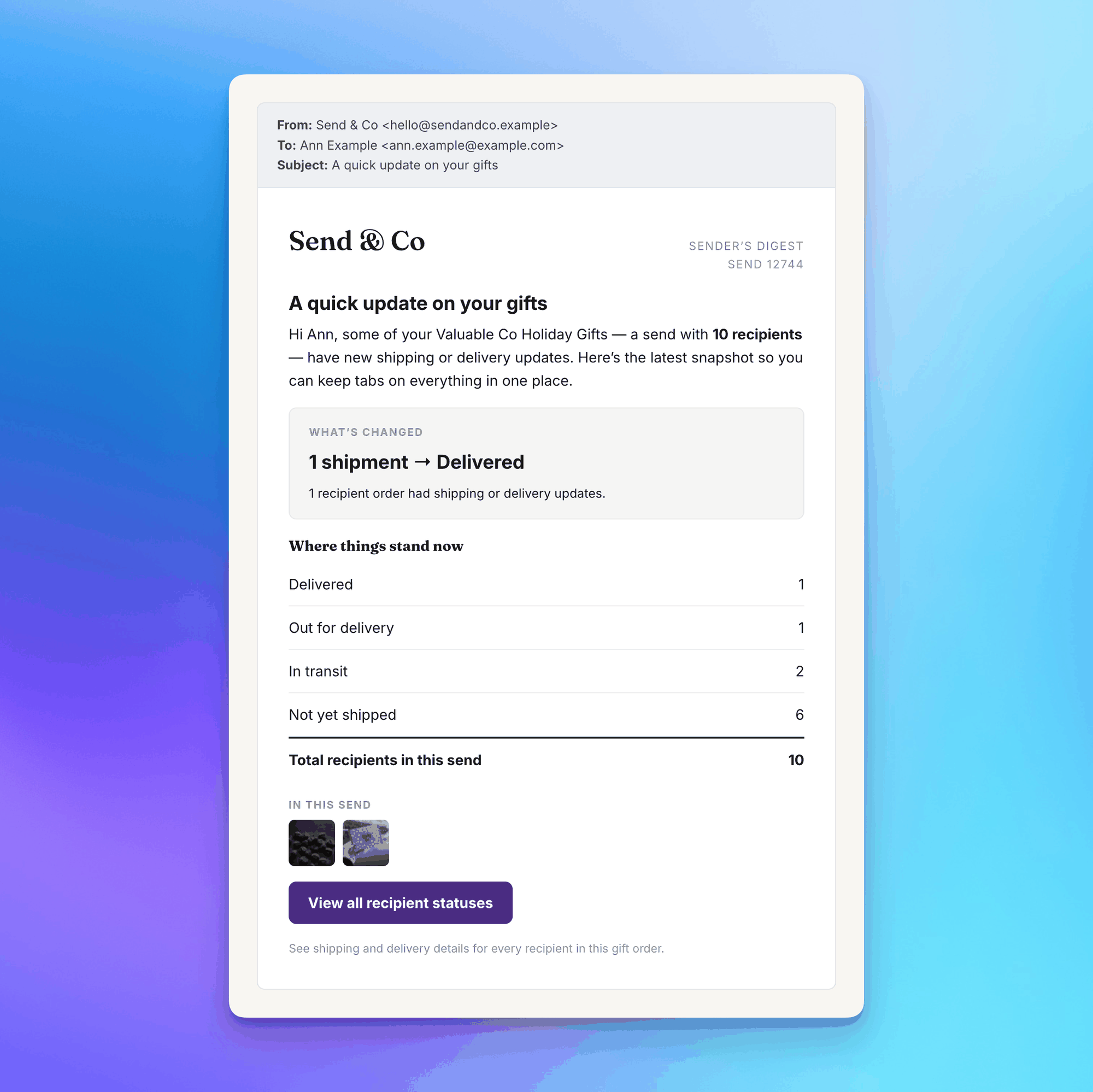
There's no digest setting inside Send To Many. Shopify Flow controls it: creating and activating a workflow with the trigger turns the digest on, and deactivating that workflow turns it off.
For the full setup, including the Flow and Klaviyo build, the complete list of trigger fields, deep-linking to the Sends page, and routing delivery problems to your team, see the tutorial: Set Up Delivery Digest Emails with Shopify Flow and Klaviyo.
Related Articles
- Set Up Delivery Digest Emails with Shopify Flow and Klaviyo: the step-by-step digest build and trigger field reference.
- How to Customize Shopify Notifications for Send To Many Orders: tailor order and shipping confirmation templates for multi-address orders.
- Send Presets: where upload and inquiry notification defaults live.
- Customer Account Extensions: Sends Page & Order Send Banner: the page the digest links to, and how to deep link to a Send.
- Shopify Flow Automation for Bulk & Multi-Recipient Orders: the other Send To Many Flow triggers.
- Send Again: Let Customers Repeat a Multi-Recipient Order: email past gifters a link that reloads their recipient list into the cart.