The new multi-recipient checkout is here
Multi-recipient checkout has been completely rebuilt. It's now the default for all new installs and available to every existing store.
Built on Liquid, not JavaScript
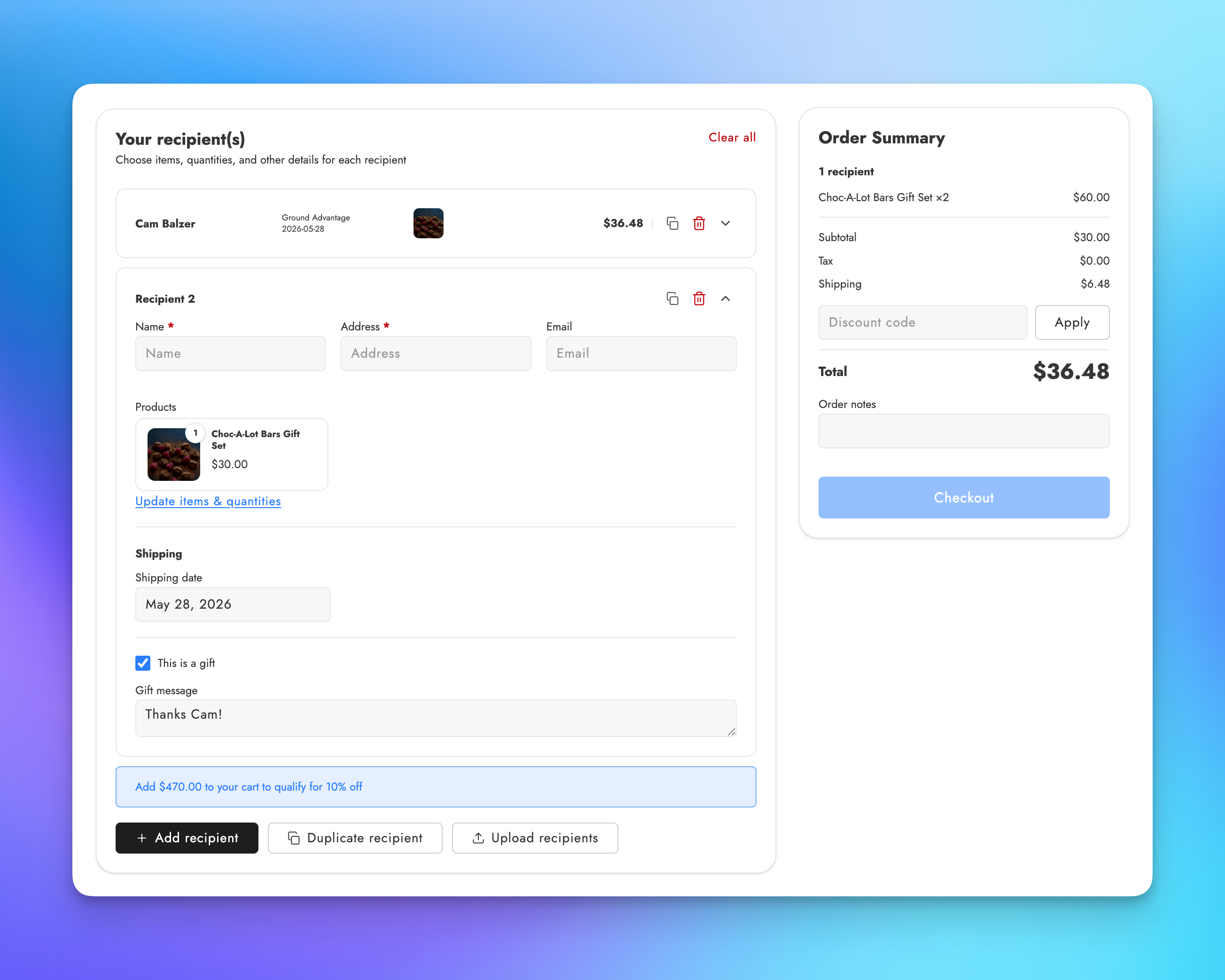
The entire checkout experience is rendered in Liquid as a Shopify theme app block. Most of the UI loads instantly with the page rather than waiting for JavaScript to initialize. While shoppers add recipients, rate calculations and validation happen in the background so the experience stays responsive. Adding a recipient, duplicating a card, or updating a gift message feels immediate.
Per-recipient product selection
Shoppers can now choose different products, variants, and quantities for each recipient directly from the checkout. Products are pulled from the cart, and each recipient card has its own product picker. When the cart has a single item at quantity one, it auto-adds to every recipient. When there are multiple items, the shopper picks what each person gets.
This was the most-requested checkout feature, and it changes what's possible: gift boxes where each person gets a different flavor, mixed product sends where some recipients get the premium tier and others get the standard. How checkout works
Product customization
Custom fields like engraving text, logo uploads, and color selections can now be configured per product and collected per recipient during checkout. You define the fields in your checkout settings, scope them to specific products, and shoppers fill them in on each recipient card. Values are stored as line item properties or metafields on the generated orders.
Date fields, dropdowns, text inputs, file uploads, and checkboxes are all supported. Product customization
Discount codes and volume discounts
Three discount code modes give you control over how codes work in checkout: disabled, applied per recipient, or applied to the entire order at Shopify checkout. Volume discounts let you set automatic tiered pricing based on recipient count or order value, with customizable upsell messages that update in real time as shoppers add recipients.
A stacking setting controls whether volume discounts combine with discount codes, and throttling prevents discount code abuse. Discounts
Multiple checkout configurations
Pro plan merchants can create multiple checkout configurations, each with its own recipient fields, gift message settings, order processing rules, discounts, and shipping options. Assign a configuration to a specific checkout page in the theme editor, and the checkout adapts. This lets you run different checkout experiences for different product lines or customer segments from a single store. Multiple configurations
Design and customization
The checkout is mobile-optimized with a single-column layout, sticky order summary bar, collapsible recipient cards, and touch-friendly product picker. Product titles link back to product pages, and a "Keep shopping" link lets shoppers add more items mid-checkout.
Over 100 CSS custom properties in the theme editor give you control over colors, typography, spacing, borders, shadows, and component-specific styles without touching code. Buttons use three configurable variants (primary, secondary, tertiary) so the checkout matches your store's look. CSS customization
Improved shipping and delivery
Shipping rates are calculated per recipient based on location and products. Zapiet and Bird integrations let you mix local delivery with standard shipping across recipients in the same checkout. Date pickers support per-recipient or order-wide scheduling with configurable availability rules, blackout dates, and flexible display and storage formats. Core settings
Upgrading
If you were on the legacy multi-recipient checkout, the new version is available now. New installs get it by default. The legacy version remains available for stores that haven't migrated yet, and all existing legacy checkout URLs continue to work.
For setup instructions, see the checkout setup tutorial. For reference documentation on all settings, start with How checkout works.